Your LinkedIn hook is the ~210 characters that decide if anyone reads your post. 60-70% never click see more. Here are the 5 hook types that work and how to write one as a founder.
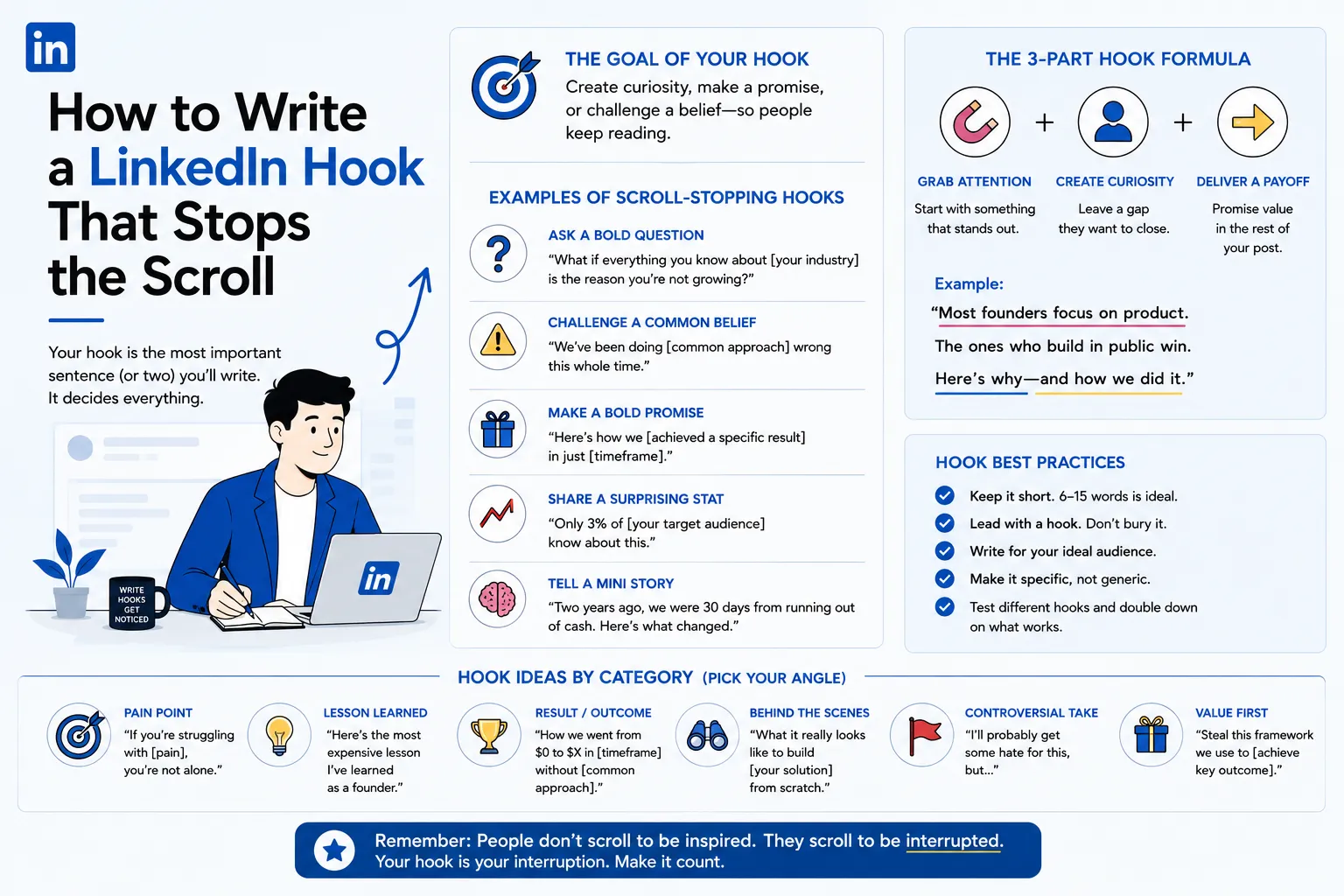
A LinkedIn hook is the first line or two of a post, the roughly 210 characters that show on desktop and 140 on mobile before the "see more" cut-off. It is the single highest-leverage sentence a founder writes all week, because it decides whether anyone reads the other 2,800 characters or scrolls past. Get it right and a thoughtful post earns the attention it deserves. Get it wrong and the best insight you have ever written stays invisible.
The stakes are not theoretical. According to ConnectSafely's analysis, 60 to 70 percent of readers never click "see more," and roughly 65 percent decide whether to expand a post based on the opening line alone. For founders, who tend to bury the point under context and caveats, the hook is usually the difference between a post that builds authority and one that quietly disappears. This guide breaks down what a hook is, why it matters this much, the five types that work, and how to write one that fits how founders actually think.
A LinkedIn hook is the opening one to three lines of a post, the only text visible in the feed before the "see more" button truncates the rest. It matters more than any other element because it is the gate: if it fails to stop the scroll, nothing else in the post gets read. LinkedIn shows only the first 210 characters or so on desktop and around 140 on mobile, where most usage now happens, so the hook has to land inside a very small window. Its job is narrow and specific. It is not to summarize the post, explain the topic, or establish credentials. It is to create enough tension or curiosity that the reader needs to click "see more." Posts with strong hooks receive two to five times more engagement than those with weak openings, not because the rest of the content is better, but because far more people actually see it. For a founder, the hook is the headline on the storefront. A weak one means the shelves inside, however well stocked, never get browsed.
This is also why writing on LinkedIn feels harder than it should. Founders are trained to lead with context and qualify their claims, which is the opposite of what a hook needs. We unpack that tension in why LinkedIn writing is hard for founders, and the hook is where it shows up first.
The mechanics of the feed make the hook decisive. AuthoredUp's study of 372,126 posts confirms that only about 210 characters appear on desktop and 140 on mobile before "see more" hides the rest. Everything below the fold is invisible until a reader chooses to expand, and most never do. That single decision point is where the majority of your potential audience is lost.
The cost of a long or slow opening is measurable. A six-month study by Stan.store found that hooks under 60 characters earned a 0.422 percent engagement rate, while hooks over 250 characters managed just 0.191 percent, a 2.2 times difference with no recovery point in between. The decline was perfectly steady, meaning every additional character in your opening line costs you reach. ConnectSafely's data points the same direction: hooks under ten words outperform longer openings by 40 percent in "see more" click rate.
The lesson is uncomfortable for thorough people. Brevity is not a stylistic preference on LinkedIn, it is a distribution mechanic. The shorter and sharper your first line, the more people read the rest, which feeds the early engagement that LinkedIn uses to decide how widely to distribute the post in the first place.
Not all hooks perform equally, and the differences are large enough to be worth knowing before you write. ConnectSafely's analysis of more than a thousand posts measured engagement and "see more" click rates by hook type, and five categories rose to the top.
The curiosity gap is the strongest performer, with an average engagement rate of 6.8 percent and a 78 percent "see more" click rate. It works by opening a loop the reader needs to close, stating just enough to provoke a question without answering it. A line like "The best hire we made this year almost got blocked as spam" forces the reader to expand to find out how.
The contrarian hook is close behind at 6.2 percent engagement and a 72 percent click rate. It challenges a widely held belief, which creates immediate tension and signals that you have a point of view. "More content is not the answer" or "Most founder advice is quietly wrong" both work because the reader wants to know whether you can defend the claim. Together, curiosity and contrarian hooks outperform the other types by roughly 2.3 times.
The personal story hook sits at 5.4 percent engagement and, notably, generates the most inbound direct messages, because it builds emotional connection and trust. "I got fired on a Monday. By Friday I had three offers" pulls the reader into a narrative. For a founder trying to turn attention into conversations, the story hook is often the most valuable despite not topping the engagement chart.
The data-driven hook earns 4.9 percent engagement and signals credibility, leading with a specific, surprising number. "We cut our sales cycle 40 percent by deleting one step" is concrete and verifiable-sounding, which is why it suits founders sharing real results. The question hook rounds out the list at 4.1 percent, useful for sparking community discussion but weaker at stopping the scroll, since a question asks for effort before it has earned attention.
You write a strong hook by leading with tension, making it specific, and keeping it short enough to land before the fold. Start with the most interesting part instead of building up to it, because the feed gives you no runway for a slow opening. Be specific rather than general: use a real number, a name, or a concrete detail, since specificity is the trait that makes a line feel true and worth reading. Keep it under roughly ten words where you can, given that short hooks outperform long ones by 40 percent in click-through. Resist the urge to front-load information; the hook's only job is to earn the "see more," not to explain the post. And never open with a greeting or a throat-clearing line like "I want to share some thoughts," because those waste the few characters that decide everything. The most reliable workflow is to write the hook first, then the post, and to draft five different openings before choosing one, since the strongest version rarely shows up on the first attempt.
The discipline that matters most is writing the hook as its own task. Spend a disproportionate share of your writing time on the opening line, treat the other versions as cheap experiments, and pick the one that creates the sharpest tension. A hook is engineered, not stumbled into, and founders who treat it as the headline rather than the introduction see the difference quickly. Folding that habit into a repeatable system is what turns occasional good posts into a consistent LinkedIn content strategy.
Most weak founder hooks fail in one of four predictable ways, and all four are fixable once you can name them.
The most common is throat-clearing. Openings like "Today I want to talk about" or "Here are my thoughts on" ask the reader to wait for the point, and nobody waits in a feed. Cut straight to the most interesting line and delete the run-up entirely.
Overhyping is the second. A hook that promises the world and a post that delivers fluff burns trust fast, and trust is the one asset a founder cannot rebuild cheaply. The hook should create tension the post actually resolves, not a clickbait gap the body cannot fill.
Making it about yourself is the third. Readers do not care about you yet; they care about their own problems. A hook framed around the reader's situation outperforms one framed around your announcement, which is why pure company news with no insight attached tends to fall flat. You can bring yourself in later through the story.
Length is the fourth. The data is unforgiving here, with engagement falling steadily as the opening line grows, so a hook that runs past the mobile fold has already lost a large share of readers before they decide anything. If your first line is more than about 200 characters, it is too long. These habits compound over time, and fixing them is one of the fastest ways to build the kind of LinkedIn authority that comes from consistently being read.
Templates are a starting point, not a crutch, but a few reliable patterns make the blank page easier. The contrast pattern sets your approach against the norm: "Most founders do X. We did the opposite, and here is what happened." The result pattern leads with an outcome and withholds the method: "We hit a number in a timeframe without the thing everyone assumes you need." The lesson pattern mines experience: "A short period of doing something taught me a small number of truths about a topic." The reframe pattern challenges accepted advice: "Everyone says X. Here is why that is quietly wrong." And the stakes pattern opens a loop around a cost or a near miss: "One sentence in my profile cost me a deal."
The way to use these is to fill them with something only you could write, a real number, a specific decision, a moment you remember. The pattern supplies the tension; your experience supplies the credibility. Rotate between two or three types from week to week and track which ones earn the most profile visits from the people you actually want to reach. That rotation is also what keeps a feed from feeling formulaic, which matters as much for distribution as the hook itself, since LinkedIn's system rewards posts that hold attention. Our breakdown of how the algorithm works explains why the hook and the engagement it drives feed directly into reach.
How long should a LinkedIn hook be? Short. Hooks under 60 characters consistently outperform longer ones, and openings under ten words beat longer lines by 40 percent in click rate. The hard ceiling is the fold, roughly 210 characters on desktop and 140 on mobile, but the best hooks come in well under that.
Where is the fold on mobile? Around 140 characters on most phones, less on smaller screens. Since the majority of LinkedIn usage is now on mobile, write your hook to land inside the mobile cut-off so it works on every device. A practical test is to make sure your first line, standing alone, creates the tension before any line break.
Should I use emojis in the hook? Sparingly, if at all. An emoji can draw the eye, but it should never carry the meaning, and a hook that depends on one is usually a weak hook. Lead with words that create curiosity or tension, and let the language do the work.
How many hooks should I write per post? At least five. The strongest opening rarely appears first, and writing several cheap variations before choosing is the single most reliable way to improve a post. Write the hook before the body, treat each version as an experiment, and pick the one that makes you most want to keep reading.
How do you write a LinkedIn hook that stops the scroll? Lead with tension, be specific, keep it under about ten words, and never open with a greeting or a summary. The hook is the 210 characters that decide whether the rest of your post gets read, and with 60 to 70 percent of readers never clicking "see more," it is the highest-return sentence you will write all week.
For founders, the shift is simple but not easy: stop introducing your posts and start hooking them. Write the opening line first, draft five versions, choose the one with the sharpest tension, and let the data settle which types work for your audience. Once the hook is earning the click, the next question is cadence, how often to publish so the habit compounds. Our guide to how often founders should post on LinkedIn covers exactly that.
If you want help turning sharper hooks into a founder content engine that actually builds pipeline, see how Rethoric works with founders.
